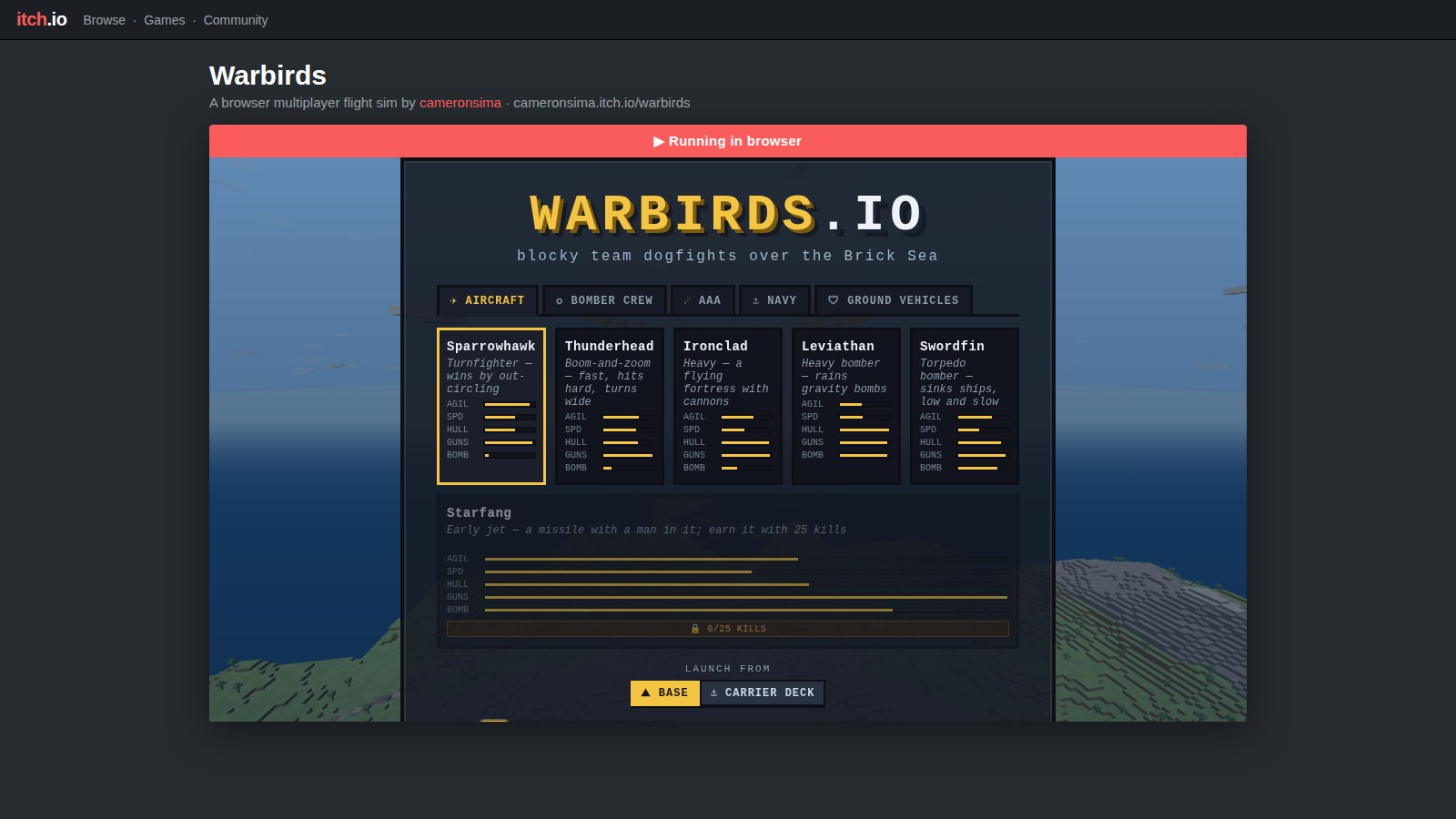
Warbirds lands on itch.io
You can now play Warbirds from its itch.io page. That sounds like a link and a screenshot, but the game is a live server with an authoritative simulation, not a bundle of files — so getting it to run inside itch's sandbox meant teaching the browser and the server to talk across an origin boundary they'd never had to cross before.
Why a link wasn't enough
itch.io serves an HTML5 game from a throwaway origin: your files land on
a sandboxed host like html-classic.itch.zone or a random
subdomain of hwcdn.net, framed inside the project page at
cameronsima.itch.io. Warbirds' client, though, was written
for exactly one deployment: served by the game server itself.
It fetched config.json with a relative URL and opened its
WebSocket at location.host — both of which, from
inside an itch frame, point at itch's CDN, where there is no game to
talk to. The page would load and then sit there, unable to reach a
server it was standing right next to.
Two doors to open
The client now understands one optional global,
window.__WARBIRDS_SERVER__. The itch build sets it to the
real server's origin, and a tiny server.js helper routes
every request through it: config.json, the daily-challenge
JSON, and the /ws socket all resolve against that origin
instead of the page's. An http(s):// base is rewritten to
the matching ws(s):// scheme for the socket. Leave the
global unset — as it is on warbirds.io itself —
and every URL stays relative, exactly as before. There is no second code
path to keep in sync; same-origin is just the empty-base case.
That gets the requests aimed at the server. The browser then
refuses to let a page on itch.zone read a response from
warbirds.io unless the server says it may — the
same-origin policy, doing its job. So the read-only JSON endpoints
(config.json, daily.json,
leaderboard.json, pilot.json) now answer with
a CORS grant when, and only when, the request carries an
Origin from itch's hosts. Rather than pin a fixed list that
rots the first time itch shuffles a CDN subdomain, the server matches on
host suffix — itch.io, itch.zone,
hwcdn.net — and echoes the caller's origin back with a
Vary: Origin so no cache ever hands one site another site's
header. Preflight OPTIONS probes are answered on the spot.
The WebSocket already accepted any origin, so the socket needed nothing.
A same-origin request carries no Origin header at all, so it
skips the whole path and gets no CORS headers — the main site is
byte-for-byte unchanged. And an origin nobody vouched for
(evil.com) gets no grant, so the browser blocks it. If you
ever need to host the client somewhere that isn't itch, a
CORS_ORIGINS environment variable takes a comma-separated
allowlist of exact origins, no rebuild required.
Proving it across the boundary
A curl can show a header is present, but it can't show the game
works — the interesting failures are the ones only a real
browser's same-origin policy produces. So the check drives an actual
embed: the client is served from a second origin with
__WARBIRDS_SERVER__ pointed back at the server, and a
headless browser loads it and boots the game for real. The first run was
the good kind of failure — the browser blocked the fetch because
the test origin wasn't on the allowlist, which is precisely the wall an
unknown site should hit. Add the origin, run again: config.json
and daily.json come back across the boundary, the WebSocket
connects, the tower reports ready for takeoff, and the console
stays clean. The screenshot above is that run.
One command to ship it
None of that should be a checklist you run by hand, so it's a build
script: npm run build:itch. It runs the normal Vite build,
then assembles an itch/ folder — the bundle, the
stylesheet, the icons, and an index.html rewritten for the
sandbox: the server global injected, asset URLs made relative (itch
serves your upload from a subpath, not the domain root), the site nav
pointed at the real server in a new tab, and the PWA manifest and
service-worker registration stripped since both assume same-origin. The
output is zipped to warbirds-itch.zip, which is the whole
upload — drop it into itch, tick “play in the
browser,” done. Point it somewhere other than the live server
with WARBIRDS_SERVER=https://… npm run build:itch.
Everything else is the same game you'd get at the front door, just
wearing an itch frame.